Excel vs School ERP: Which Is Better for Managing a School?
Many schools begin managing student records, attendance, fees, and examinations using Excel spreadsheets. While Excel is affordable and familiar, it becomes…
Why More Schools Are Moving Beyond Spreadsheets
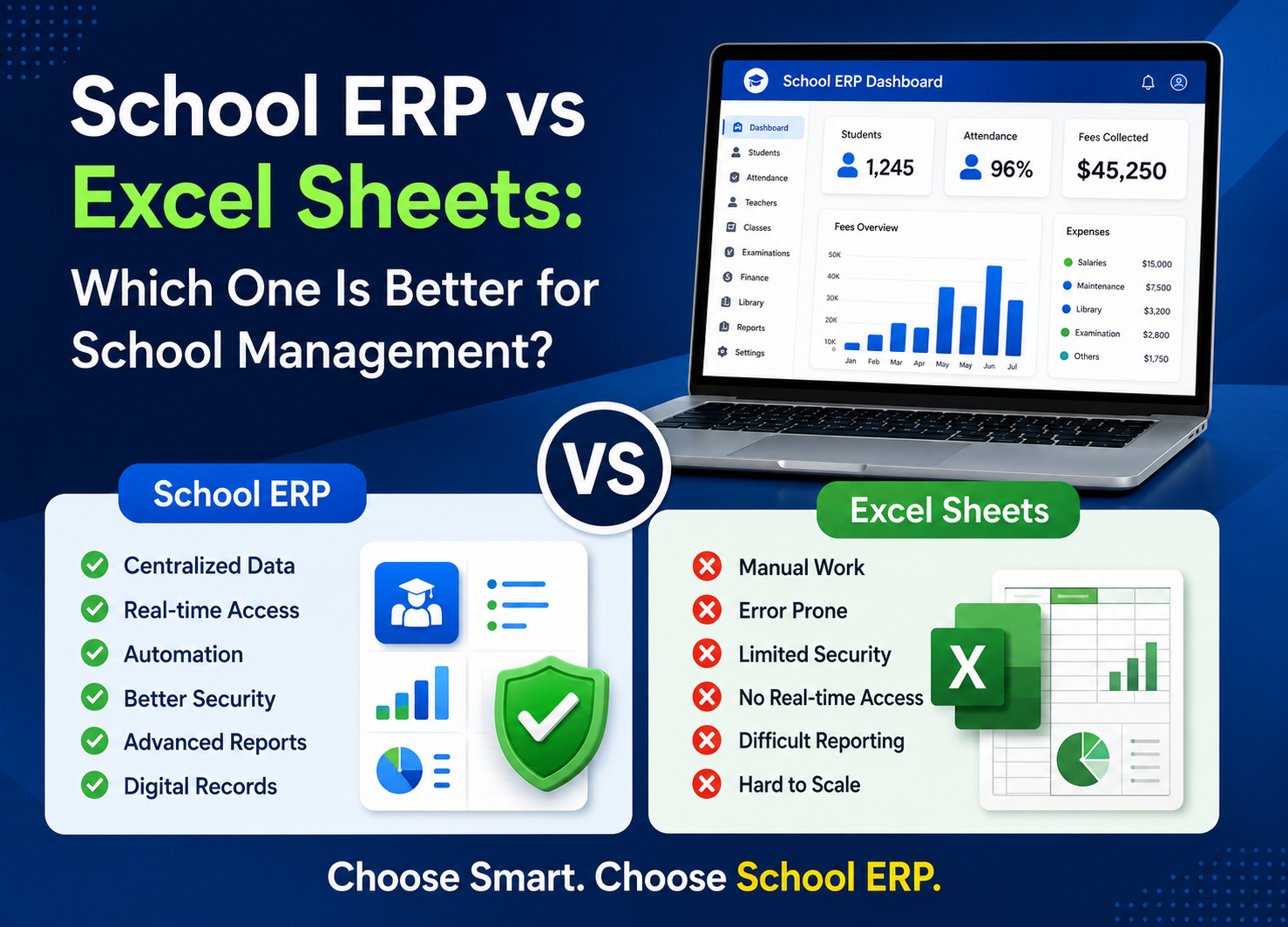
Many schools begin managing student records, attendance, fees, and examinations using Excel spreadsheets. While Excel is affordable and familiar, it becomes difficult to manage as the number of students, teachers, and administrative tasks grows. A modern School ERP System automates daily operations, improves accuracy, and saves valuable administrative time. In this guide, we’ll compare Excel and School ERP Software to help you determine which solution is best for your school.
As educational institutions expand, administrators often find themselves spending more time managing data than focusing on improving educational outcomes. This is where School ERP Software becomes a game-changer.
outcomes. This is where School ERP Software becomes a game-changer.
But which option is truly better for managing a school: Excel or a School ERP System?
Understanding Excel in School Management
Microsoft Excel is one of the most commonly used tools in schools due to its familiarity and affordability.
Schools often use Excel for:
 Student records
- Attendance tracking
- Fee management
- Examination results
- Timetable planning
- Administrative reports
While Excel works well for small-scale data management, challenges begin to appear as the number of students, staff, and daily operations increases.
What Is a School ERP System?
A School ERP connects every department through a centralized cloud-based platform, allowing administrators, teachers, students, and parents to access real-time information securely.
A modern School ERP can manage:
- Admissions
- Attendance
- Fee Collection
- Examinations
- Parent Communication
- Student Information
- Reports & Analytics
Instead of maintaining multiple spreadsheets, all information is stored and managed through a single platform.
Data Management
Managing student records in Excel often means maintaining multiple spreadsheets.
Excel Limitations
- Multiple spreadsheets
- Duplicate records
- Difficult searching
- Manual updates
PARLI ERP Advantages
All information is stored in one centralized database.
Benefits:
- Centralized database
- Real-time updates
- Smart search
- Secure cloud storage
Attendance Management
Attendance requires daily manual entry and regular updates.
Excel
- Manual attendance
- Formula errors
- No parent notifications
School ERP
Attendance can be recorded digitally and updated instantly.
Benefits:
- One-click attendance
- Automatic reports
- Mobile attendance
- Parent notifications
Fee Collection and Tracking
Tracking fee payments manually becomes difficult as student numbers increase.
Common Issues:
- Missed payments
- Manual calculations
- Delayed reporting
School ERP
ERP software automates fee management processes.
Features:
- Online payments
- Payment reminders
- Instant receipts
- Outstanding tracking
Parent Communication
Excel cannot facilitate communication with parents.
Schools often rely on:
- Phone calls
- Individual messages
- Printed notices
School ERP
Built-in communication tools allow schools to send:
Features:
- Notifications
- Circulars
- Event updates
- Important announcements
Report Generation
Creating reports often requires manual calculations and formatting.
Excel Limitations
- Time-intensive
- Formula errors
- Delayed decision-making
Automated Reports
Reports are generated automatically with a few clicks.
Examples:
- Attendance Reports
- Fee Reports
- Admission Reports
- Examination Reports
Data Security
Spreadsheets can be accidentally deleted, shared incorrectly, or modified without authorization.
Risks:
- Data loss
- Security breaches
- Limited access control
School ERP
ERP systems offer advanced security features such as:
- Role-based access
- Cloud backups
- Data encryption
- User activity tracking
Scalability
Excel works reasonably well for small schools but becomes difficult to manage as operations grow.
School Growth
Because readers understand it faster.
Administrative Efficiency
Administrative staff spend hours entering, updating, and verifying data.
School ERP
Automation eliminates repetitive tasks and reduces workload significantly.
Benefits:
- Faster operations
- Fewer errors
- Improved productivity
Why Schools Are Switching to ERP Software
Educational institutions are increasingly adopting ERP systems because they provide:
Better Efficiency
Automates routine tasks and saves valuable time.
Improved Accuracy
Reduces human errors in attendance, fees, and reporting.
Enhanced Communication
Keeps parents, teachers, and administrators connected.
Faster Decision-Making
Provides real-time reports and actionable insights.
Better Student Experience
Improves service delivery and transparency.
Final Verdict: Excel or School ERP?
Excel is useful for managing basic school records, but it becomes increasingly difficult as your institution grows. A School ERP provides automation, centralized data management, real-time reporting, secure access, and seamless communication between administrators, teachers, students, and parents. For schools planning long-term growth and digital transformation, investing in a School ERP is the smarter and more scalable choice.
The real question is not whether Excel works—it does. The question is whether it can support the future growth and digital transformation goals of your institution.
Schedule a Free Demo
Ready to simplify school management?
See how PARLI school ERP software helps schools automate attendance, fees, homework, and parent communication from one platform.